

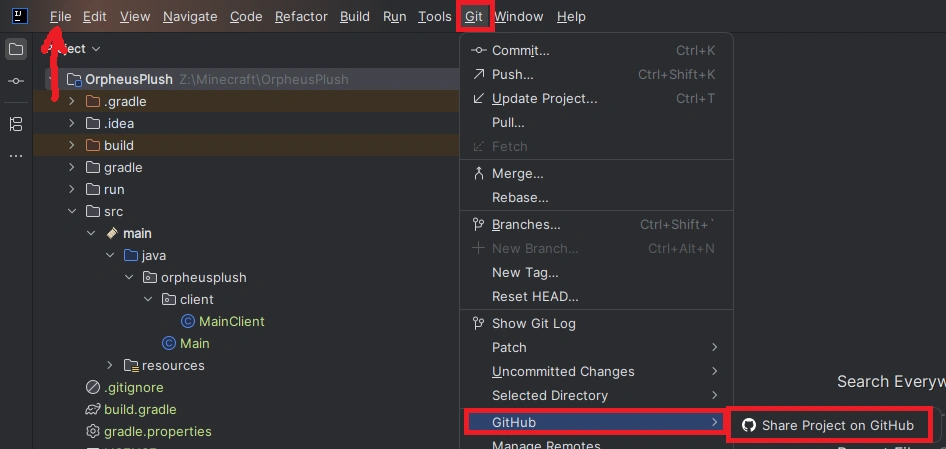
In Intellij, go to Menu > Git > GitHub > Share Project On GitHub, disable Private and Share, this should create a Git repo for you.
If you aren't using Intellij, create an empty (don't add any files yet) repository on GitHub and run the commands GitHub prompts you to in your project folder.
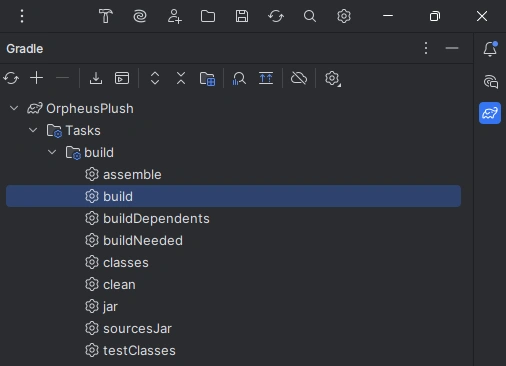
First we need to package our mod, in Intellij click on the gradle icon (the elephant) on the left of your screen and double click build to create a jar containing all your work.
Go to Modrinth and click the + in the top left (sign in if you haven't already) and create a new project. Modrinth already guides you through the process, but watch out for these common pitfalls to prevent getting your mod rejected:
Made with  by Hack Club.